BDS 754: Principles of Programming with Python

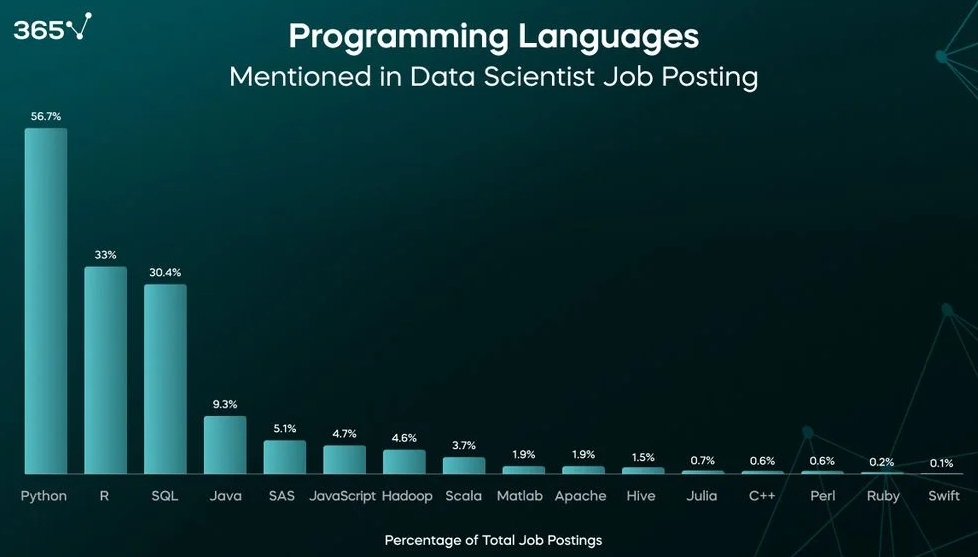
Popularity means more people creating products in Python, including free software.
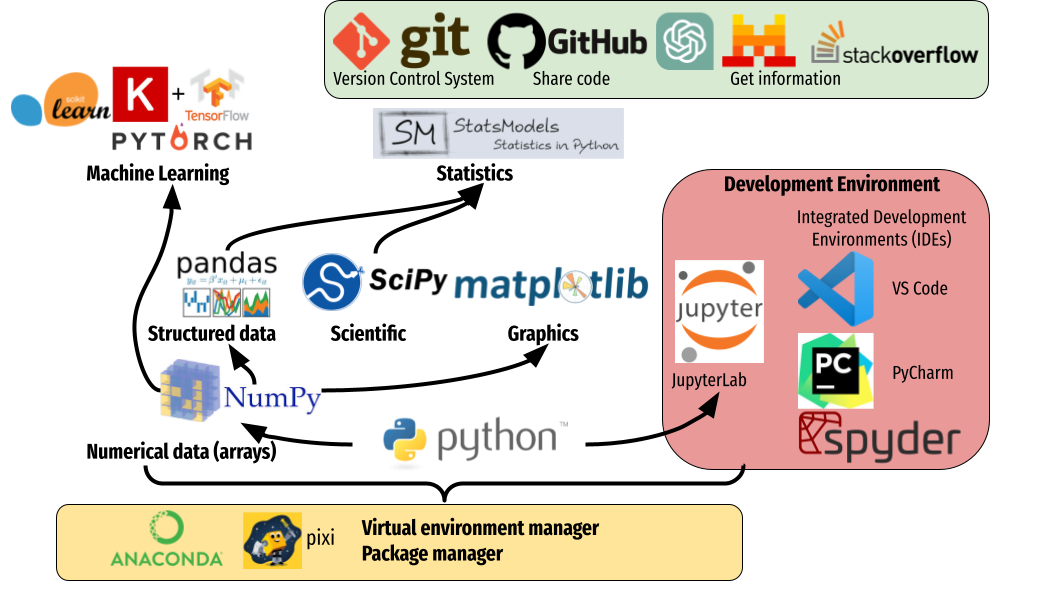
Most of the software underlying modern A.I. is free Python libraries (Pytorch, Numpy, BLAS variants)
https://duchesnay.github.io/pystatsml/introduction/introduction_python_for_datascience.html
https://trends.google.com/trends/explore?cat=31&date=all&q=python,R,matlab,spss,stata
This course will cover Python for people without programming skills.
Specific focus will be on methods, libraries, and tools used in Data Science, including linear algebra, text processing, and modern A.I.
We will focus on the following broad areas
Point of lab/participation/homework is to encourage you to study and learn. Easy points.
Quizzes will be closed-book and test your understanding of the basic concepts from the homework and previous week.
Point of exams is to decide your grade. They will be based on the quizzes and homeworks.
Vector geometry
Matrix Algebra
Prob & Stat won't be used much
We will follow much of Python for Everybody by Charles Severance for programming basics.
The text is available online: https://www.py4e.com/book.php
The lessons are available at: https://www.py4e.com/lessons
Lecture videos, slieds, code, etc.: https://www.py4e.com/materials
There is a vast supply of other free Python resources online.
some python and linear algebra review material: https://www.keithdillon.com/index.php/bootcamp/
programming style based on intuition, momentum, and creative flow, letting A.I. handle the details, rather than doing careful planning, formal specifications, or following best practices.
May be ok for...
Drawbacks: accumulates technical debt and does not scale well to large systems or teams.
past decisions in creating software which inhibit ability to build on it. Eventually must be "paid" by rewriting/refactoring.
# simple solution. easy to understand

def mean(xs: list[float]) -> float:
    return sum(xs) / len(xs)
# potential A.I. solution...

import numpy as np
import pandas as pd
from statistics import mean as stat_mean
from typing import List, Optional
import logging

logging.basicConfig(level=logging.INFO)

class StatsEngine:
    def __init__(self, data: List[float]):
        self.df = pd.DataFrame({"values": data})

    def compute_mean(self) -> Optional[float]:
        try:
            np_array = self.df["values"].to_numpy(dtype=float)
            result = stat_mean(np_array)
            logging.info("Mean computed successfully")
            return float(result)
        except Exception as e:
            logging.error("Failed to compute mean: %s", e)
            return None

def mean(xs: List[float]) -> float:
    engine = StatsEngine(xs)
    result = engine.compute_mean()
    if result is None:
        raise ValueError("mean computation failed")
    return result
It was trained on code written with different priorities from yours.
The code has all these dependencies, meaning code from elsewhere it leverags. This adds greatly to the size of the software product, hurts its performance, and possibly affects licensing.
import numpy as np
import pandas as pd
from statistics import mean as stat_mean
from typing import List, Optional
import logging
If any of them changes or becomes unavailable the code must be updated. This process continues constantly in industry.
This complexity also inhibits ability to understand the code (and learn in our class!) if something goes wrong or needs to be changed. For example, for some project you want to change the statistic computation slightly. Maybe the library can't even do what you want.
A.I. is good at some things and in some applications, and bad at others. You need to find out which in your case
Examples I've seen recently:
Improving (optimizing) the prompt you give, including instructions in the settings, makes a huge difference. And the question of what is best is not intuitive.
"end-to-end" operation - trying to get A.I. to give final answer when provided the original problem.
e2e might work or it might give a nonworking mess that's impossible to understand.
Instead, break problem into smaller tasks, where you can understand and check each part. How you would help an assistant get a large task done.
Non-source-control approach - make a copy of all your code periodically, or each time there's an important point reached (like you added something abd got it working). Then if you make changes and break something, you can go back or compare exactly what got changed. You might do the same for papers you write.
Source control - a.k.a. Version control. software to track such changes for you, remembering all previous versions, allowing changes to be undone and compared.
You indicate the "check ins" when the source control software is to find and remember everything you changed.
The collection of check-ins is called the repository, or repo.
Uses efficient string difference algorithms to save only the minimal information for each saved change. E.g., minimum edit distance change.
"Git is a free and open source distributed version control system designed to handle everything from small to very large projects with speed and efficiency."
You can create and access repos, view changes in them, and do more complex things like merging different versions of files.
git init                 # start tracking a project
git clone <url>          # copy an existing repo
git status               # see what changed
git add <file>           # stage changes
git commit -m "message"  # create a snapshot
git log                  # view history
git branch               # list branches -- more advanced, don't worry about it now
git checkout -b feature  # create and switch branch
git merge feature        # combine branches -- more advanced, don't worry about it now
git pull                 # fetch + merge from remote
git push # send commits to remoteA Cloud-based code sharing and backup platform that can connect to a git repo
Huge amount of shared projects. Most open source is here.
Create account to join classroom repo: https://github.com/signup
notes.txt.git clone <REPO_URL>
cd <repo-folder>
This creates a local copy with full history.
Not needed yet since we just got it, but try out the command.
git pull
git status
Shows modified files.
git diff
Shows exactly what lines changed. Students must read this output.
Alternative: use a graphical merge tool suich as Meld ow Winmerge
git add notes.txt
Verify:
git status
A single document containing a series of "cells". Each containing code which can be run, or images and other documentation.
[shift] + [Enter] or "play" button in the menu.
Will execute code and display result below, or render markup etc.
Can also use R or Julia (easily), Matlab, SQL, etc. (with increasing difficulty).
Easiest to install Jupyter via Anaconda on Windows/Mac. Or directly with Linux.
https://www.anaconda.com/download/
Highly recomended to make a separate environment for class - hot open source tools change fast and deprecate (i.e. break) old features constantly
conda install jupyter matplotlib numpy scipy ...Many other packages...
[shift] + [tab] after the opening parenthesis function(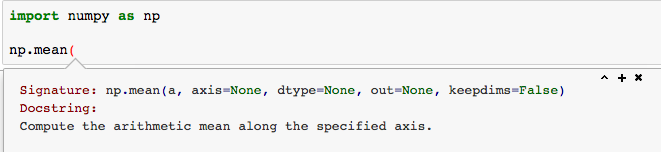
function?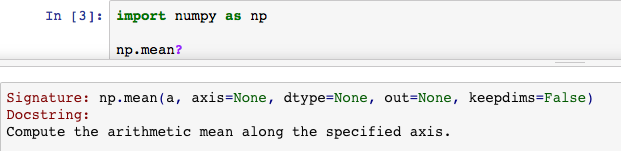
import datetime

print("This code is run right now (" + str(datetime.datetime.now()) + ")")

'hi'
This code is run right now (2026-01-06 10:28:53.318267)
'hi'
x=1+2+2

print(x)
5
import numpy as np
np.random.randn(2,5)
array([[ 1.24350758,  1.99906955, -0.3226366 , -0.98266019, -0.1309466 ],
       [-0.85026968, -0.35865037,  0.70637075,  1.06492839,  0.35220974]])
np.ones((2,2))
array([[1., 1.],
       [1., 1.]])