BDS 754: Python for Data Science

Text processing
Intro to Modern NLP
Reading - Text processing:
Further reading - Dynamic Programming:
Reading - NLP:
Processing formatted records which are in varying text formats, such as converting different date formats '01/01/24' vs 'Jan 1, 2024' vs '1 January 2024' to a single numerical variable
Processing survey data or health records in text format, use NLP to convert unstructured text to a categorical variable.
Processing other sequential data such as DNA or biological signals
Modern A.I. (Large Language Models) are trained to solve NLP problems using large collections of text. Model incorporates general knowlege for any topic broadly understood, such as science, health, psychology, and can be applied outside of NLP problems
In computing, text is stored in strings (the data structure)
Strings are lists of characters.
In Natural Language Programming (NLP), the levels are:
Source: Taming Text, p 9
Indicate by quotes (either single or double works)
x = 'a'
y = '3'
z = '&'
q = '"'
print(x,y,z,q)
a 3 & "
Methods to find deeper understanding of an author’s intent.
For example, algorithms for summarization often require being able to identify which sentences are more important than others.
Similar to the paragraph level, understanding the meaning of a document
Often requires knowledge that goes beyond what’s contained in the actual document.
Authors often expect readers to have a certain background or possess certain reading skills.
At this level, people want to quickly find items of interest as well as group related documents and read summaries of those documents.
Applications that can aggregate and organize facts and opinions and find relationships are particularly useful.
Information Retrieval: a related area here (which also uses modern NLP methods among others).
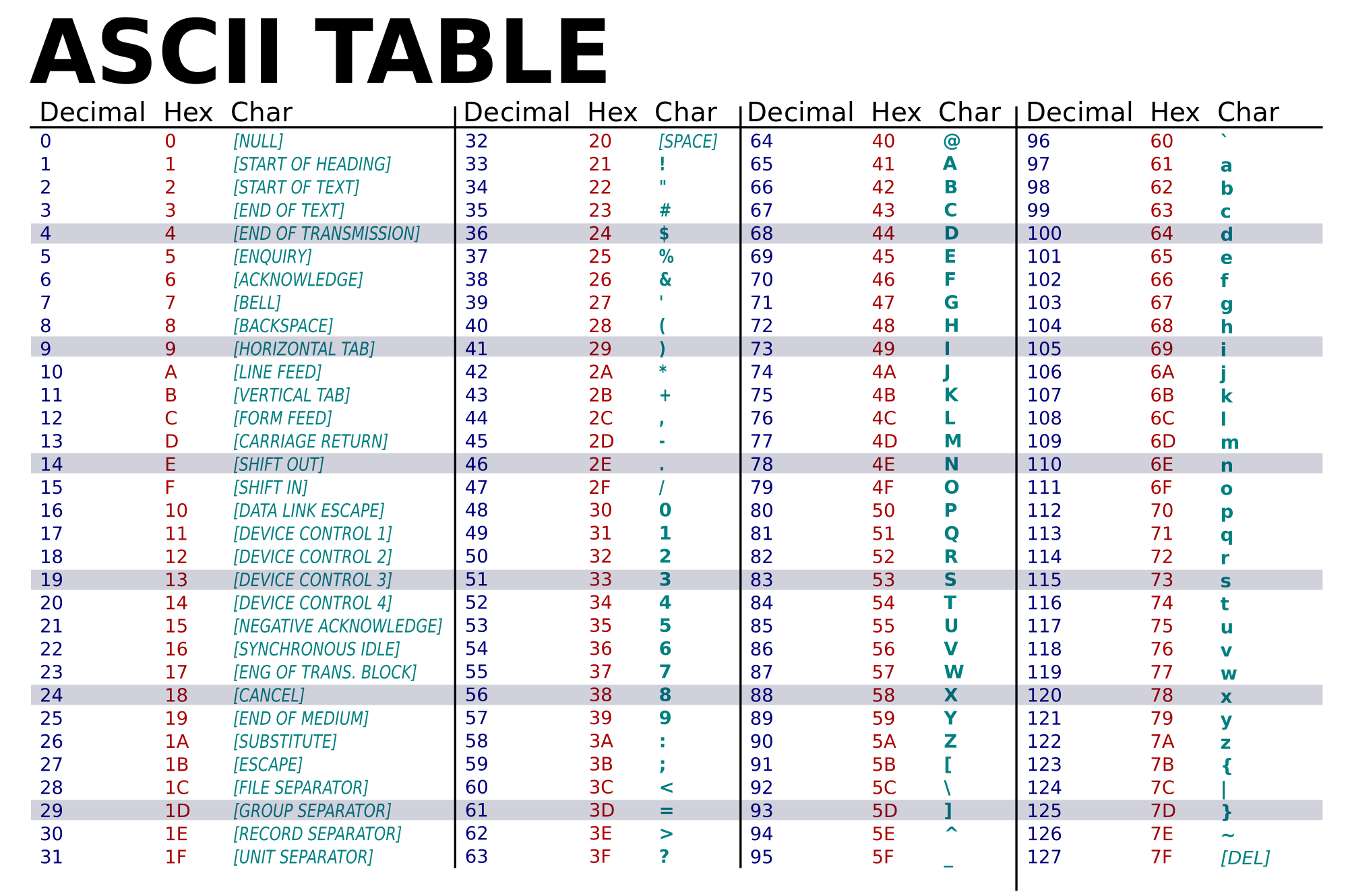
ascii(38)
'38'
str(38), float('38')
('38', 38.0)
chr(38)
'&'
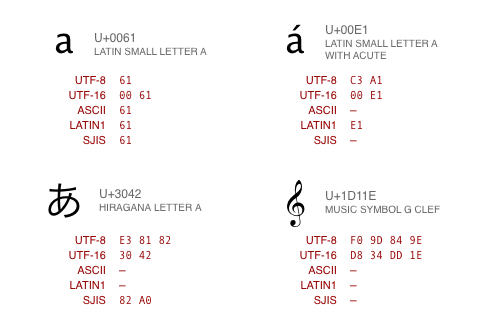
lookup table of unique numbers ("code points") denoting every possible character in a giant list of all languages
Encoding still needed to decide which subset to use, how to represent in binary
various standards:
chr(2^30+1) # for python 3
'\x1d'

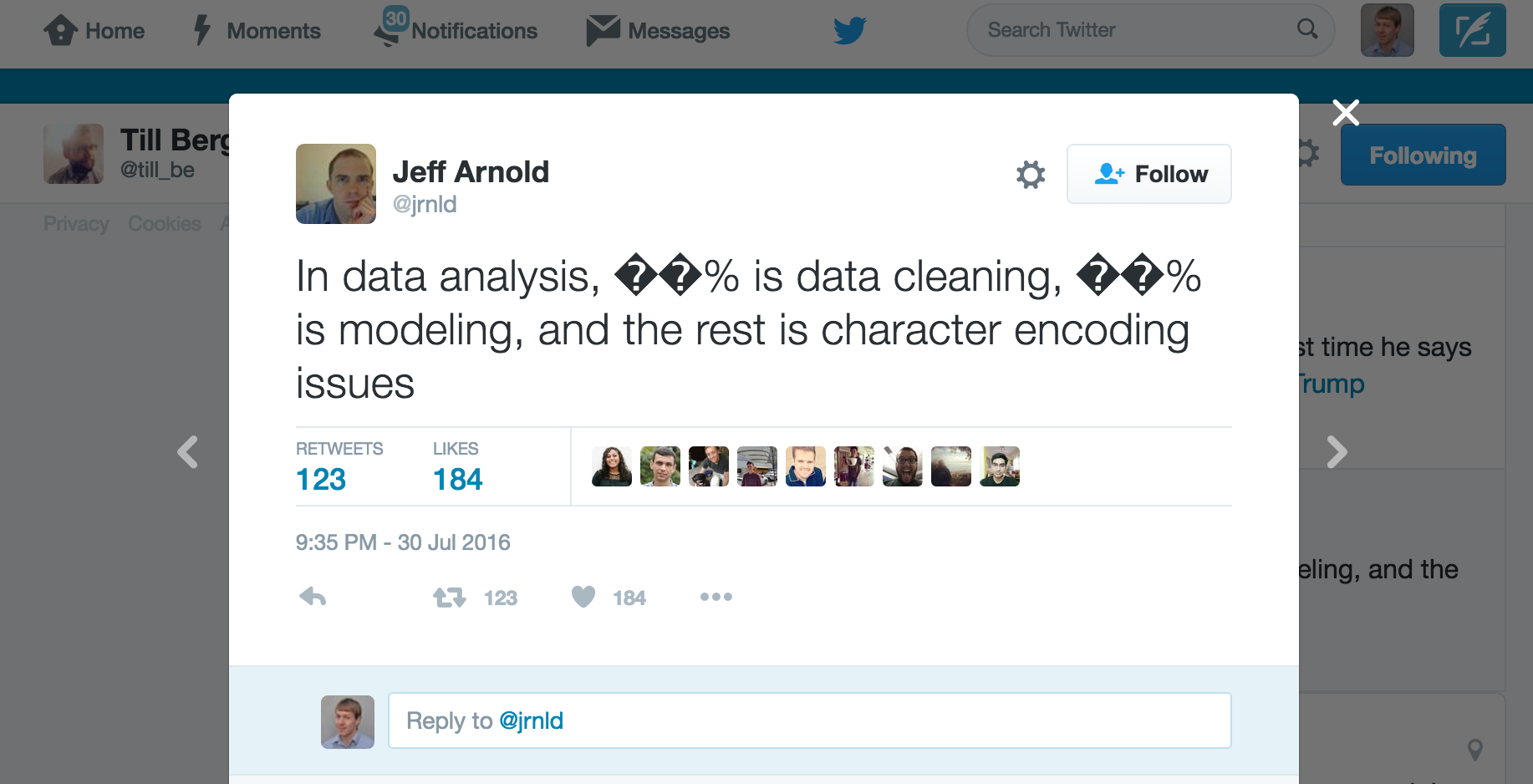
Incorrect, unreadable characters shown when computer software fails to show text correctly.
It is a result of text being decoded using an unintended character encoding.
Very common in Japanese websites, hence the name:
文字 (moji) "character" + 化け (bake) "transform"
L = [1,2,3,4,5,6]
print(L)
print("length =",len(L))
print(L[0],L[1],L[2])
[1, 2, 3, 4, 5, 6]
length = 6
1 2 3
[1,2,3,4,5][3]
4
Matlabesque way to select sub-sequences from list
Make slices for even and odd indexed members of this list.
[1,2,3,4,5][:3]
[1, 2, 3]
[1,2,3,4,5][0:1]
[1]
List of characters
s = 'Hello there'

print(s)
Hello there
print(s[0],s[2])
H l
(s[0],s[2])
('H', 'l')
print(s[:2])
He
x = 'hello'
y = 'there'
z = '!'

print(x,y,z) # x,y,z is actually a tuple
hello there !
# addition concatenates lists or characters or strings

xyz = x+y+z
print(xyz)
hellothere!
spc = chr(32)
spc
' '
How do we fix the spacing in this sentence?
xyz = 'hello there'
print(xyz.split(' '))
['hello', 'there']
print(xyz.split())
['hello', 'there']
print(xyz.split('e'))
['h', 'llo th', 'r', '']
fname = 'smith_05_2024.txt'

root = fname.split('.')
root
['smith_05_2024', 'txt']
rootparts = root[0].split('_')
rootparts
['smith', '05', '2024']
name = rootparts[0]
name
'smith'
fname.split('.')[0].split('_')[0]
'smith'
mylist = xyz.split()
print(mylist)
['hello', 'there']
print(' '.join(mylist))
hello there
print('_'.join(mylist))
hello_there
from string import *
whos
Variable          Type        Data/Info
---------------------------------------
Formatter         type        <class 'string.Formatter'>
L                 list        n=6
Template          type        <class 'string.Template'>
ascii_letters     str         abcdefghijklmnopqrstuvwxy<...>BCDEFGHIJKLMNOPQRSTUVWXYZ
ascii_lowercase   str         abcdefghijklmnopqrstuvwxyz
ascii_uppercase   str         ABCDEFGHIJKLMNOPQRSTUVWXYZ
capwords          function    <function capwords at 0x00000181E7B2DF80>
dat0              list        n=3
dat1              list        n=4
digits            str         0123456789
hexdigits         str         0123456789abcdefABCDEF
literal1          str         calendar
literal2          str         calandar
literal3          str         celender
mylist            list        n=2
octdigits         str         01234567
pattern2          str         c[ae]l[ae]nd[ae]r
patterns          str         calendar|calandar|celender

punctuation       str         !"#$%&'()*+,-./:;<=>?@[\]^_`{|}~
re                module      <module 're' from 'C:\\Us<...>4\\Lib\\re\\__init__.py'>
s                 str         Hello there
st                str         calendar foo calandar cal celender calli
string            module      <module 'string' from 'C:<...>_083124\\Lib\\string.py'>
sub_pattern       str         [ae]

x                 str         hello
xyz               str         hello there
xyz2              str         hellothere2!
y                 str         there
z                 str         !
Let's make a simple password generator function!
Your code should return something like this:
'kZmuSUVeVC'
'mGEsuIfl91'
'FEFsWwAgLM'
import random
import string

n = 10
pw = ''.join((random.choice(string.ascii_letters + string.digits) for n in range(n)))
Break this down and figure out how it works
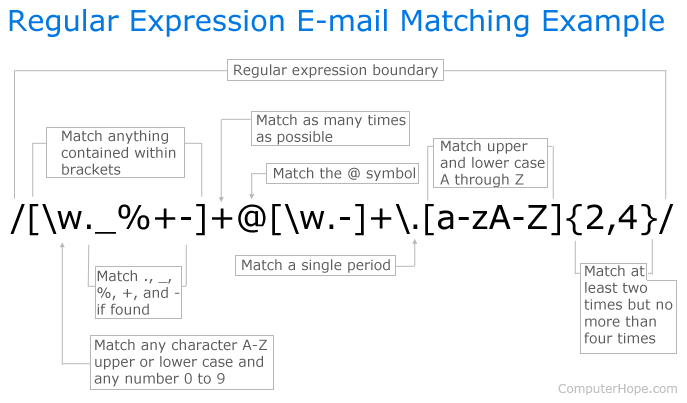
Used in grep, awk, ed, perl, ...
Regular expression is a pattern matching language, the "RE language".
A Domain Specific Language (DSL). Powerful (but limited language). E.g. SQL, Markdown.
from re import *
whos
Variable     Type         Data/Info
-----------------------------------
A            RegexFlag    re.ASCII
ASCII        RegexFlag    re.ASCII
DOTALL       RegexFlag    re.DOTALL
I            RegexFlag    re.IGNORECASE
IGNORECASE   RegexFlag    re.IGNORECASE
L            RegexFlag    re.LOCALE
LOCALE       RegexFlag    re.LOCALE
M            RegexFlag    re.MULTILINE
MULTILINE    RegexFlag    re.MULTILINE
Match        type         <class 're.Match'>
Pattern      type         <class 're.Pattern'>
S            RegexFlag    re.DOTALL
U            RegexFlag    re.UNICODE
UNICODE      RegexFlag    re.UNICODE
VERBOSE      RegexFlag    re.VERBOSE
X            RegexFlag    re.VERBOSE
compile      function     <function compile at 0x000001F92F137430>
error        type         <class 're.error'>
escape       function     <function escape at 0x000001F92F1375E0>
findall      function     <function findall at 0x000001F92F137310>
finditer     function     <function finditer at 0x000001F92F1373A0>
fullmatch    function     <function fullmatch at 0x000001F92F137040>
match        function     <function match at 0x000001F92F08D700>
purge        function     <function purge at 0x000001F92F1374C0>
search       function     <function search at 0x000001F92F1370D0>
split        function     <function split at 0x000001F92F137280>
sub          function     <function sub at 0x000001F92F137160>
subn         function     <function subn at 0x000001F92F1371F0>
template     function     <function template at 0x000001F92F137550>
Write a regex to match common misspellings of calendar: "calendar", "calandar", or "celender"
# Let's explore how to do this

# Patterns to match
dat0 = ["calendar", "calandar", "celender"]

# Patterns to not match
dat1 = ["foo", "cal", "calli", "calaaaandar"]

# Interleave them
st = " ".join([item for pair in zip(dat0, dat1) for item in pair])
st
'calendar foo calandar cal celender calli'
# You match it with literals
literal1 = 'calendar'
literal2 = 'calandar'
literal3 = 'celender'

patterns = "|".join([literal1, literal2, literal3])

patterns
'calendar|calandar|celender'
import re

print(re.findall(patterns, st))
['calendar', 'calandar', 'celender']
Let's write it with regex language
sub_pattern = '[ae]'
pattern2 = sub_pattern.join(["c","l","nd","r"])

print(pattern2)
c[ae]l[ae]nd[ae]r
print(st)

re.findall(pattern2, st)
calendar foo calandar cal celender calli
['calendar', 'calandar', 'celender']
pick function based on goal (find all matches, replace matches, find first match, ...)
form search expression to account for variations in target we allow. E.g. possible misspellings.
special characters that have a unique meaning
 [] A set of characters. Ex: "[a-m]"

 \  Signals a special sequence, also used to escape special characters). Ex: "\d"

 .  Any character (except newline character). Ex: "he..o"

 ^  Starts with. Ex: "^hello"

 $  Ends with. Ex: "world$"

 *  Zero or more occurrences. Ex: "aix*"

 +  One or more occurrences. Ex: "aix+"

 {} Specified number of occurrences. Ex: "al{2}"

 |  Either or. Ex: "falls|stays"

() Capture and groupA way of indicating that we want to use one of our metacharacters as a literal.
In a regular expression an escape sequence is metacharacter \ (backslash) in front of the metacharacter that we want to use as a literal.
Ex: If we want to find \file in the target string c:\file then we would need to use the search expression \\file (each \ we want to search for as a literal (there are 2) is preceded by an escape sequence ).
a set of characters inside a pair of square brackets [] with a special meaning:
target_string = 'fgsfdgsgf 415-805-1888 xxxddd 800-555-1234'

pattern1 = '[0-9][0-9][0-9]-[0-9][0-9][0-9]-[0-9][0-9][0-9][0-9]'
print(re.findall(pattern1,target_string))
['415-805-1888', '800-555-1234']
pattern2 = '\\d\\d\\d-\\d\\d\\d-\\d\\d\\d\\d'
print(re.findall(pattern2,target_string))
['415-805-1888', '800-555-1234']
pattern3 = '\\d{3}-\\d{3}-\\d{4}'
print(re.findall(pattern3,target_string))
['415-805-1888', '800-555-1234']
\d{3}-\d{3}-\d{4} uses Quantifiers.
Quantifiers: allow you to specify how many times the preceding expression should match.
{} is extact quantifier.
print(re.findall('x?','xxxy'))
['x', 'x', 'x', '', '']
print(re.findall('x+','xxxy'))
['xxx']
Problem: You have odd line breaks in your text.
text = 'Long-\nterm problems with short-\nterm solutions.'
print(text)
Long-
term problems with short-
term solutions.
text.replace('-\n','\n')
'Long\nterm problems with short\nterm solutions.'
Solution: Write a regex to find the "dash with line break" and replace it with just a line break.
import re
# 1st Attempt
text = 'Long-\nterm problems with short-\nterm solutions.'
re.sub('(\\w+)-\\n(\\w+)', r'-', text)
'- problems with - solutions.'
Not right. We need capturing groups.
Capturing groups allow you to apply regex operators to the groups that have been matched by regex.
For for example, if you wanted to list all the image files in a folder. You could then use a pattern such as ^(IMG\d+\.png)$ to capture and extract the full filename, but if you only wanted to capture the filename without the extension, you could use the pattern ^(IMG\d+)\.png$ which only captures the part before the period.
re.sub(r'(\w+)-\n(\w+)', r'\1-\2', text)
'Long-term problems with short-term solutions.'
The parentheses around the word characters (specified by \w) means that any matching text should be captured into a group.
The '\1' and '\2' specifiers refer to the text in the first and second captured groups.
"Long" and "term" are the first and second captured groups for the first match.
"short" and "term" are the first and second captured groups for the next match.
NOTE: 1-based indexing
# speed of regex versus naive implementation

import re
import time
import random
import string

# naive wildcard match
def naive_find(text, pattern):
    matches = []
    n = len(text)
    m = len(pattern)

    for i in range(n - m + 1):
        ok = True
        for j in range(m):
            if pattern[j] != "*" and text[i + j] != pattern[j]:
                ok = False
                break
        if ok:
            matches.append(i)
    return matches

# generate random text
letters = string.ascii_lowercase + " "
text = "".join(random.choice(letters) for _ in range(300000))

pattern = "th*s is"

# naive timing
t0 = time.time()
naive_matches = naive_find(text, pattern)
t1 = time.time()

# regex timing
t2 = time.time()
regex_pattern = pattern.replace("*", ".")
r = re.compile(regex_pattern)
regex_matches = [m.start() for m in r.finditer(text)]
t3 = time.time()

print("naive matches:", len(naive_matches))
print("regex matches:", len(regex_matches))
print("naive time:", t1 - t0)
print("regex time:", t3 - t2)
naive matches: 0
regex matches: 0
naive time: 0.13492965698242188
regex time: 0.0
With wildcards of varying lengths, it can still require combinatoric number of matches
import re
import time

# pathological regex pattern
pattern = re.compile(r'(a+)+b')

# input with no terminating 'b'
text = "a" * 24

t0 = time.time()
match = pattern.search(text)
t1 = time.time()

print('text:', text)
print('pattern:', pattern)
print("match:", match)
print("time:", t1 - t0)
text: aaaaaaaaaaaaaaaaaaaaaaaa
pattern: re.compile('(a+)+b')
match: None
time: 1.8922786712646484
Dividing a stream of language into component sentences.
Sentences can be defined as a set of words that is complete in itself, typically containing a subject and predicate.
Sentence segmentation typically done using punctuation, particularly the full stop character "." as a reasonable approximation.
Complications because punctuation also used in abbreviations, which may or may not also terminate a sentence.
For example, Dr. Evil.
A Confederacy Of Dunces
By John Kennedy Toole
A green hunting cap squeezed the top of the fleshy balloon of a head. The green earflaps, full of large ears and uncut hair and the fine bristles that grew in the ears themselves, stuck out on either side like turn signals indicating two directions at once. Full, pursed lips protruded beneath the bushy black moustache and, at their corners, sank into little folds filled with disapproval and potato chip crumbs. In the shadow under the green visor of the cap Ignatius J. Reilly’s supercilious blue and yellow eyes looked down upon the other people waiting under the clock at the D.H. Holmes department store, studying the crowd of people for signs of bad taste in dress.
sentence_1 = A green hunting cap squeezed the top of the fleshy balloon of a head.
sentence_2 = The green earflaps, full of large ears and uncut hair and the fine bristles that grew in the ears themselves, stuck out on either side like turn signals indicating two directions at once.
sentence_3 = Full, pursed lips protruded beneath the bushy black moustache and, at their corners, sank into little folds filled with disapproval and potato chip crumbs.
sentence_4 = In the shadow under the green visor of the cap Ignatius J. Reilly’s supercilious blue and yellow eyes looked down upon the other people waiting under the clock at the D.H. Holmes department store, studying the crowd of people for signs of bad taste in dress.
text = """A green hunting cap squeezed the top of the fleshy balloon of a head. The green earflaps, full of large ears and uncut hair and the fine bristles that grew in the ears themselves, stuck out on either side like turn signals indicating two directions at once. Full, pursed lips protruded beneath the bushy black moustache and, at their corners, sank into little folds filled with disapproval and potato chip crumbs. In the shadow under the green visor of the cap Ignatius J. Reilly’s supercilious blue and yellow eyes looked down upon the other people waiting under the clock at the D.H. Holmes department store, studying the crowd of people for signs of bad taste in dress. """
import re

pattern = "|".join(['!', # end with "!"
                    '\\?', # end with "?"
                    '\\.\\D', # end with "." and the full stop is not followed by a number
                    '\\.\\s']) # end with "." and the full stop is followed by a whitespace

print(pattern)
!|\?|\.\D|\.\s
re.split(pattern, text)
['A green hunting cap squeezed the top of the fleshy balloon of a head',
 'The green earflaps, full of large ears and uncut hair and the fine bristles that grew in the ears themselves, stuck out on either side like turn signals indicating two directions at once',
 'Full, pursed lips protruded beneath the bushy black moustache and, at their corners, sank into little folds filled with disapproval and potato chip crumbs',
 'In the shadow under the green visor of the cap Ignatius J',
 'Reilly’s supercilious blue and yellow eyes looked down upon the other people waiting under the clock at the D',
 '',
 'Holmes department store, studying the crowd of people for signs of bad taste in dress',
 '']
pattern = r"(?<!\w\.\w.)(?<![A-Z][a-z]\.)(?<=\.|\?)\s"
re.split(pattern, text)
['A green hunting cap squeezed the top of the fleshy balloon of a head.',
 'The green earflaps, full of large ears and uncut hair and the fine bristles that grew in the ears themselves, stuck out on either side like turn signals indicating two directions at once.',
 'Full, pursed lips protruded beneath the bushy black moustache and, at their corners, sank into little folds filled with disapproval and potato chip crumbs.',
 'In the shadow under the green visor of the cap Ignatius J.',
 'Reilly’s supercilious blue and yellow eyes looked down upon the other people waiting under the clock at the D.H. Holmes department store, studying the crowd of people for signs of bad taste in dress.',
 '']
Breaking a stream of text up into words, phrases, symbols, or other meaningful elements called tokens
The simplest way to tokenize is to split on white space
sentence1 = 'Sky is blue and trees are green'
sentence1.split(' ')
['Sky', 'is', 'blue', 'and', 'trees', 'are', 'green']
sentence1.split() # in fact it's the default
['Sky', 'is', 'blue', 'and', 'trees', 'are', 'green']
Sometimes you might also want to deal with abbreviations, hypenations, puntuations and other characters.
In those cases, you would want to use regex.
However, going through a sentence multiple times can be slow to run if the corpus is long
import re

sentence2 = 'This state-of-the-art technology is cool, isn\'t it?'

sentence2 = re.sub('-', ' ', sentence2)
sentence2 = re.sub('[,|.|?]', '', sentence2)
sentence2 = re.sub('n\'t', ' not', sentence2)
print(sentence2)

sentence2_tokens = re.split('\\s+', sentence2)

print(sentence2_tokens)
This state of the art technology is cool is not it
['This', 'state', 'of', 'the', 'art', 'technology', 'is', 'cool', 'is', 'not', 'it']
In this case, there are 11 tokens and the size of the vocabulary is 10
print('Number of tokens:', len(sentence2_tokens))
print('Number of vocabulary:', len(set(sentence2_tokens)))
Number of tokens: 11
Number of vocabulary: 10
Tokenization is a major component of modern language models and A.I., where tokens are defined more generally.
A morpheme is the smallest unit of language that has meaning. Two types:
Example: "unbelievable"
What is the stem? What is the affixes?
"believe" is a stem.
"un" and "able" are affixes.
What we usually want to do in NLP preprocessing is get the stem by eliminating the affixes from a token.
Stemming usually refers to a crude heuristic process that chops off the ends of words.
Ex: automates, automating and automatic could be stemmed to automat
Exercise: how would you implement this using regex? What difficulties would you run into?
Lemmatization aims to remove inflectional endings only and to return the base or dictionary form of a word, which is known as the lemma.
This is doing things properly with the use of a vocabulary and morphological analysis of words.
How are stemming and lemmatization similar/different?
Many analogous tasks in processing DNA and RNA sequences
Fing places where pattern $P$ is found within text $T$.
What python functions do this?
Also very important problem. Not trivial for massive datasets.
Alignment - compare $P$ to same-length substring of $T$ at some starting point.

Use base python to perform this.
How many calculations will this take in the most naive approach possible?
Naive approach: test all possible alignments for match.
Ideas for improvement:
When performing a slow search algorithm over a large dataset, start with fast algorithm with poor FPR to reject obvious mismatches.
Ex. BLAST (sequence alignment) in bioinformatics, followed by slow accurate structure alignment technique.
Correlation screening
SAFE screening
Rather than match vs no match, we now need a similarity score a.k.a. distance $d$(string1, string2)
How similar are these two curves, assuming we ignore varying timescales?
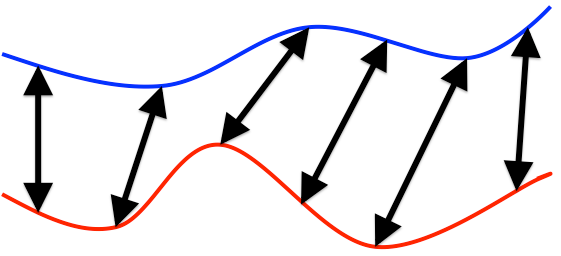
Example: we wish to determine location of hiker given altitude measurements during hike.
Note the amount of warping is often not the distance metric. We first "warp" the pattern, then compute distance some other way, e.g. LMS. Final distance as the closest LMS possible over all acceptable warpings.
Dynamic Time Warping
Minimum number of operations needed to convert one string into other
Ex. typo correction: how do we decide what "scool" was supposed to be?
Consider possibilities with lowest edit distance. "school" or "cool".
Hamming distance - operations consist only of substitutions of character (i.e. count differences)
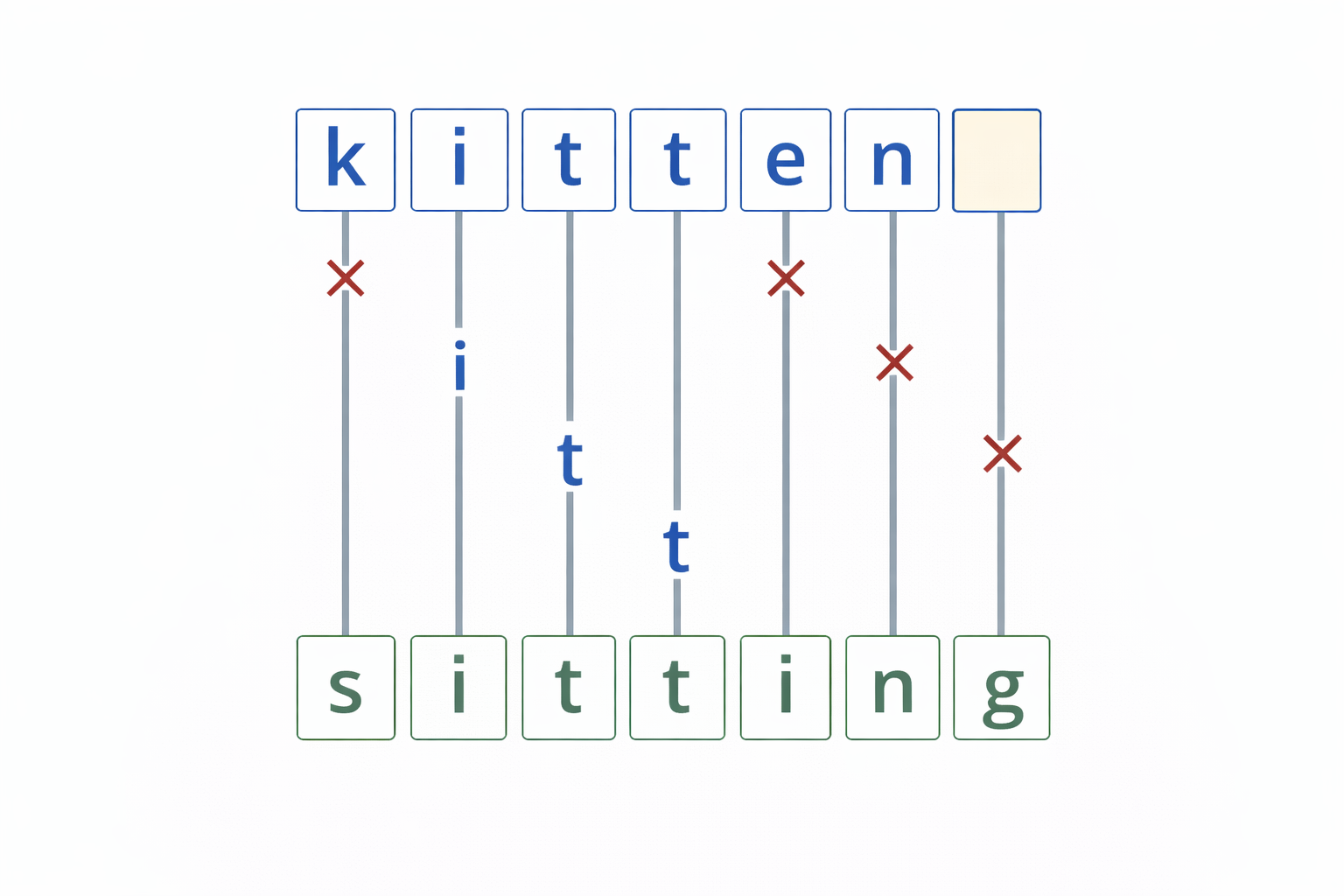
Special case where the operations are the insertion, deletion, or substitution of a character
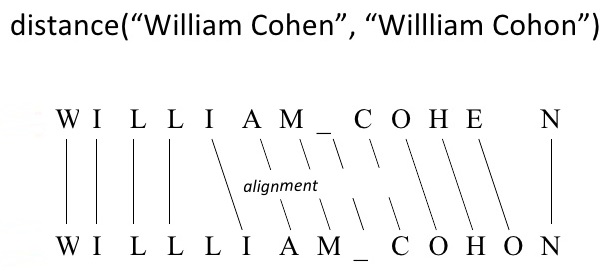
Count the minimum number needed to convert $P$ into $T$.
Interchangably called "edit distance".
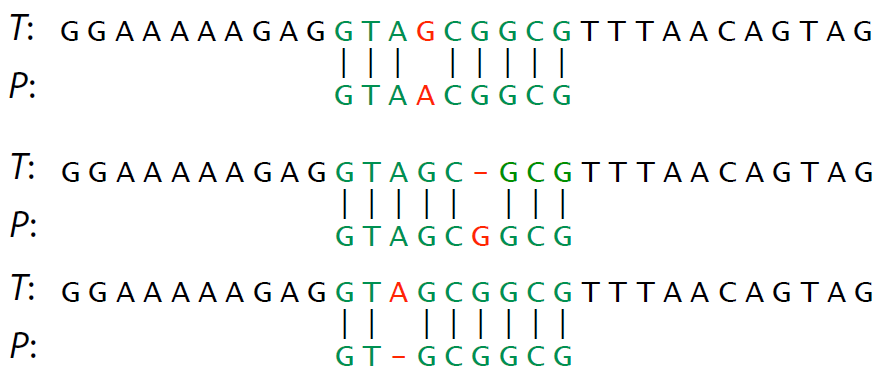
Comprehension check: give three different ways to transform $P$ into $T$ (not necessarily fewest operations)
Recursively use substring match results to compute
$$ \text{Let } D[0,j] = j, \quad \text{and let } D[i,0] = i $$$$ \text{Otherwise, let } D[i,j] = \min \begin{cases} D[i-1,j] + 1 \\ D[i,j-1] + 1 \\ D[i-1,j-1] + \delta(x[i-1],y[j-1]) \end{cases} $$$$ \delta(a,b) = \begin{cases} 0 & \text{if } a=b \\ 1 & \text{otherwise} \end{cases} $$# recursive implementation
def D(a, b):
if a=='': return len(b)
if b=='': return len(a)
if a[-1] == b[-1]:
delta = 0
else:
delta = 1
return min(
D(a[:-1], b) + 1,
D(a, b[:-1]) + 1,
D(a[:-1], b[:-1]) + delta
)
a = "chocolate"
b = "anniversary"
import time
t0 = time.time(); d = D(a, b); t1 = time.time()
print("distance:", d, "time:", t1 - t0)
distance: 10 time: 3.675112247467041
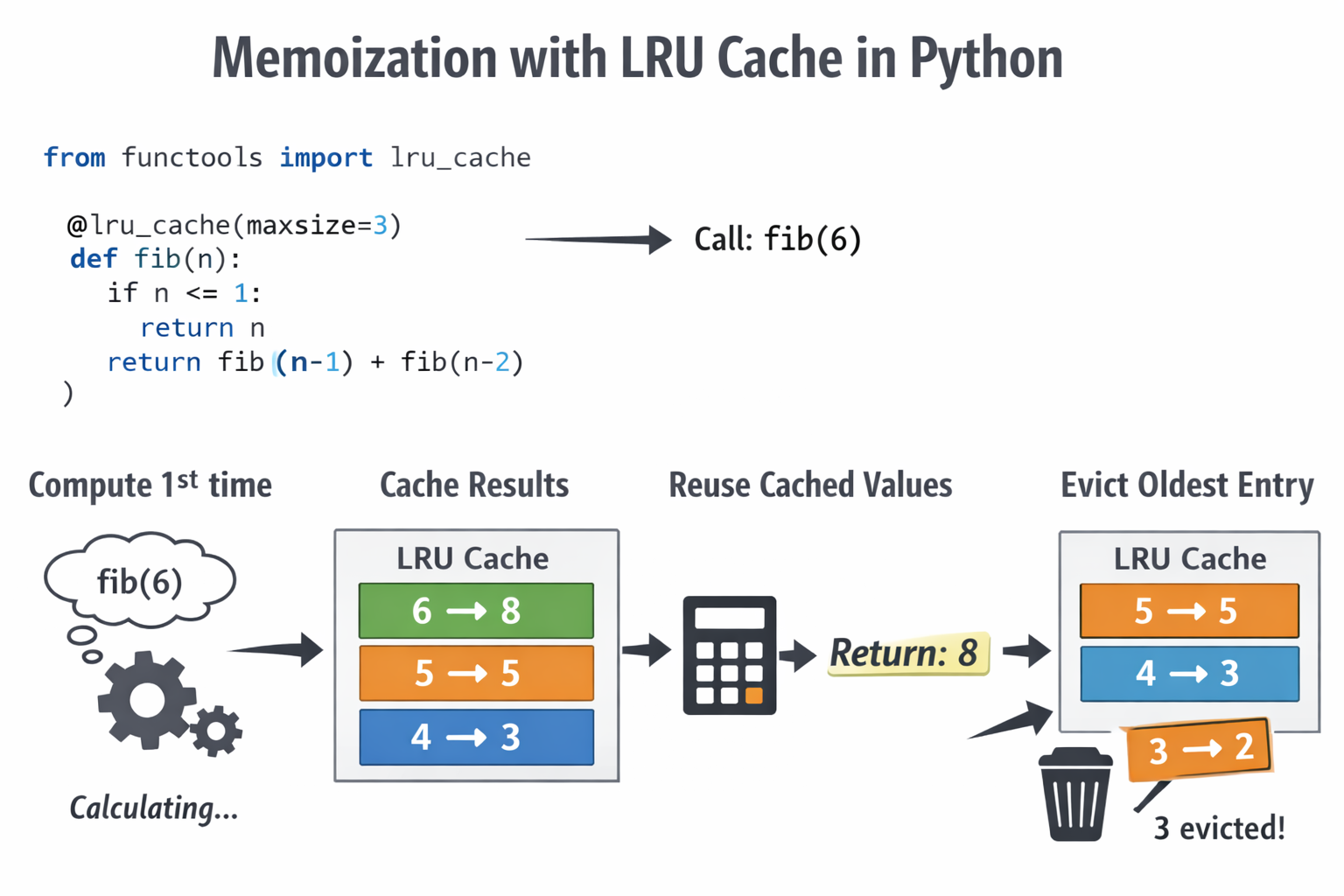
Deal with repeatedly calculating same terms
def fib_recursive(n):
    if n == 0: return 0
    if n == 1: return 1
    return fib_recursive(n-1) + fib_recursive(n-2)

Each term requires two additional terms be calculated. Exponential time.
Intelligently plan terms to calculate and store ("cache"), e.g. in a table.

Each term requires one term be calculated.
Always plan out the data structure and calculation order.
The data structure to fill in for Fibonacci is trivial:

Optimal order is to start at bottom and work up to $n$, so always have what you need for next term.
# Dynamic programming version

def edit_distance(x, y):

    def delta(a, b):
        if a == b:
            return 0
        return 1

    m = len(x)
    n = len(y)

    # D has (m+1) rows and (n+1) columns
    D = []
    for i in range(m + 1):
        row = []
        for j in range(n + 1):
            row.append(0)
        D.append(row)

    # Let D[0,j] = j
    for j in range(n + 1):
        D[0][j] = j

    # Let D[i,0] = i
    for i in range(m + 1):
        D[i][0] = i

    # Otherwise, let D[i,j] = min(...)
    for i in range(1, m + 1):
        for j in range(1, n + 1):
            D[i][j] = min(
                D[i - 1][j] + 1,
                D[i][j - 1] + 1,
                D[i - 1][j - 1] + delta(x[i - 1], y[j - 1])
            )

    return D
a = "chocolate"
b = "anniversary"

import time
t0 = time.time();
d = edit_distance(a, b);
t1 = time.time()
print("distance:", d[-1][-1], "time:", t1 - t0)
distance: 10 time: 0.0
x = "kitten"
y = "sitting"

import time
t0 = time.time();
D = edit_distance(x, y)
t1 = time.time()

for row in D:
    print(row)

print("\ndistance:", D[len(x)][len(y)], "time:", t1 - t0)
[0, 1, 2, 3, 4, 5, 6, 7]
[1, 1, 2, 3, 4, 5, 6, 7]
[2, 2, 1, 2, 3, 4, 5, 6]
[3, 3, 2, 1, 2, 3, 4, 5]
[4, 4, 3, 2, 1, 2, 3, 4]
[5, 5, 4, 3, 2, 2, 3, 4]
[6, 6, 5, 4, 3, 3, 2, 3]

distance: 3 time: 0.0015840530395507812
D[i,j] = min edits needed to convert x[:i] into y[:j]
Up: D[i−1,j]+1 - delete a character from x
Left: D[i,j−1]+1 - insert a character into x
Diagonal: D[i−1,j−1]+δ(x[i−1],y[j−1]) - match or substitute
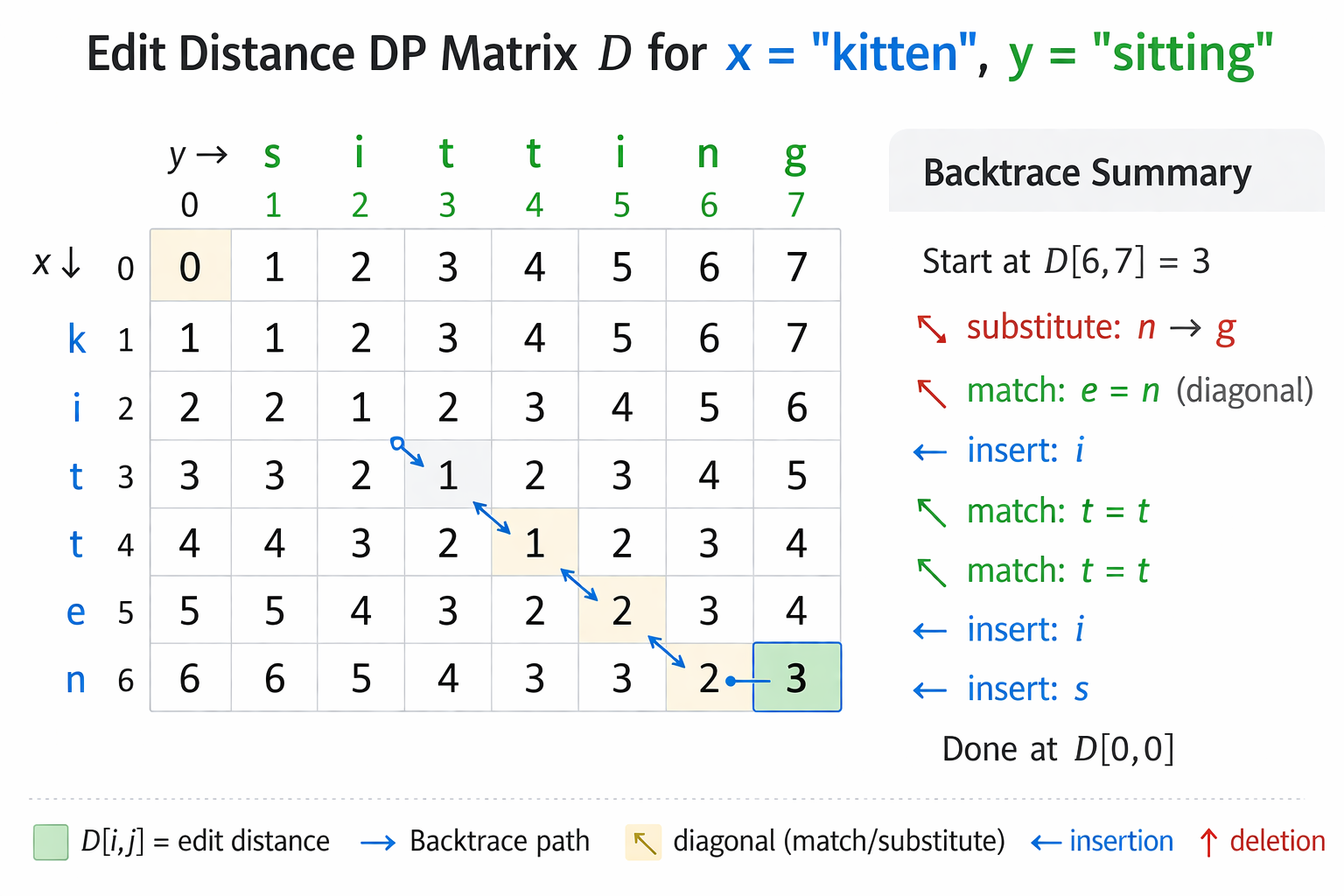
The backtrace gives the edit by taking step with smallest value
from functools import lru_cache

@lru_cache()
def D(a, b):
    if a=='': return len(b)
    if b=='': return len(a)
    if a[-1] == b[-1]:
        delta = 0
    else:
        delta = 1
    return min(
        D(a[:-1], b) + 1,
        D(a, b[:-1]) + 1,
        D(a[:-1], b[:-1]) + delta
    )

a = "chocolate"
b = "anniversary"

import time
t0 = time.time(); d = D(a, b); t1 = time.time()
print("distance:", d, "time:", t1 - t0)
distance: 10 time: 0.0009992122650146484
Application of edit distance and backtrace
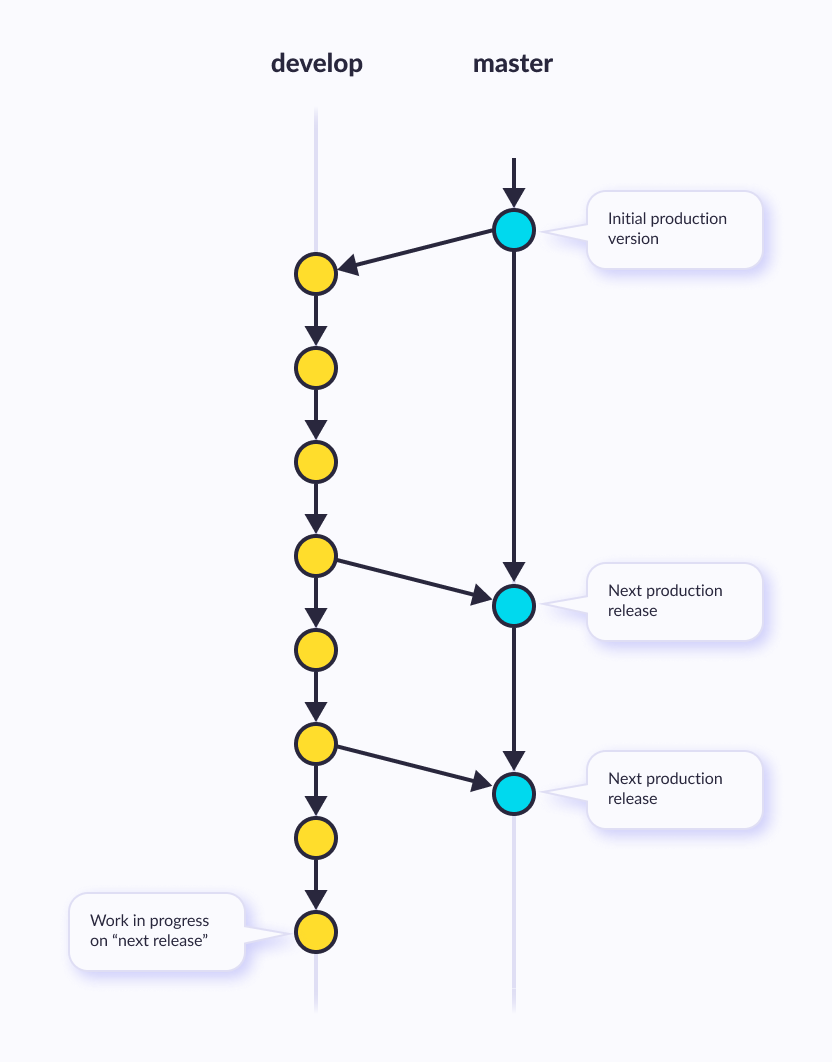
Essentially the minimal list of edits which convert one sequence into another
Used for version control (git) - nodes are versions, edges are described with diffs
import difflib

old = "return x * x"
new = "return x ** 2"

# character-based diff
diff = difflib.ndiff(old, new)

for d in diff:
    print(d)
  r
  e
  t
  u
  r
  n

  x

  *
+ *

- x
+ 2
old_code = """
def square(x):
    return x * x
""".strip().splitlines()

new_code = """
def square(x):
    print("computing square")
    return x ** 2
""".strip().splitlines()

# line-based diff
diff = difflib.unified_diff(old_code,new_code,fromfile="old.py",tofile="new.py")

for line in diff:
    print(line)
--- old.py

+++ new.py

@@ -1,2 +1,3 @@

 def square(x):
-    return x * x
+    print("computing square")
+    return x ** 2
Inlcudes some of the tasks we solved last class
Small libraries to solve the easier NLP problems and related string operations
May include crude solutions for the harder problems (i.e. low-accuracy speech recognition)
Natural Language Toolkit (nltk) is a Python package for NLP
Pros: Common, Functionality
Cons: academic, slow, Awkward API
import nltk

#printcols(dir(nltk),3)
#nltk.download('genesis')
#nltk.download('brown')
nltk.download('abc')
[nltk_data] Downloading package abc to
[nltk_data]     C:\Users\micro\AppData\Roaming\nltk_data...
[nltk_data]   Package abc is already up-to-date!
True
from nltk.corpus import abc

printcols(dir(abc),2)
_LazyCorpusLoader__args        __init__
_LazyCorpusLoader__kwargs      __init_subclass__
_LazyCorpusLoader__load        __le__
_LazyCorpusLoader__name        __lt__
_LazyCorpusLoader__reader_cls  __module__
__class__                      __name__
__delattr__                    __ne__
__dict__                       __new__
__dir__                        __reduce__
__doc__                        __reduce_ex__
__eq__                         __repr__
__firstlineno__                __setattr__
__format__                     __sizeof__
__ge__                         __static_attributes__
__getattr__                    __str__
__getattribute__               __subclasshook__
__getstate__                   __weakref__
__gt__                         _unload
__hash__                       subdir
print(abc.raw()[:500])
PM denies knowledge of AWB kickbacks
The Prime Minister has denied he knew AWB was paying kickbacks to Iraq despite writing to the wheat exporter asking to be kept fully informed on Iraq wheat sales.
Letters from John Howard and Deputy Prime Minister Mark Vaile to AWB have been released by the Cole inquiry into the oil for food program.
In one of the letters Mr Howard asks AWB managing director Andrew Lindberg to remain in close contact with the Government on Iraq wheat sales.
The Opposition's G
import nltk
help(nltk.tokenize)
Help on package nltk.tokenize in nltk:

NAME
    nltk.tokenize - NLTK Tokenizer Package

DESCRIPTION
    Tokenizers divide strings into lists of substrings.  For example,
    tokenizers can be used to find the words and punctuation in a string:

        >>> from nltk.tokenize import word_tokenize
        >>> s = '''Good muffins cost $3.88\nin New York.  Please buy me
        ... two of them.\n\nThanks.'''
        >>> word_tokenize(s) # doctest: +NORMALIZE_WHITESPACE
        ['Good', 'muffins', 'cost', '$', '3.88', 'in', 'New', 'York', '.',
        'Please', 'buy', 'me', 'two', 'of', 'them', '.', 'Thanks', '.']

    This particular tokenizer requires the Punkt sentence tokenization
    models to be installed. NLTK also provides a simpler,
    regular-expression based tokenizer, which splits text on whitespace
    and punctuation:

        >>> from nltk.tokenize import wordpunct_tokenize
        >>> wordpunct_tokenize(s) # doctest: +NORMALIZE_WHITESPACE
        ['Good', 'muffins', 'cost', '$', '3', '.', '88', 'in', 'New', 'York', '.',
        'Please', 'buy', 'me', 'two', 'of', 'them', '.', 'Thanks', '.']

    We can also operate at the level of sentences, using the sentence
    tokenizer directly as follows:

        >>> from nltk.tokenize import sent_tokenize, word_tokenize
        >>> sent_tokenize(s)
        ['Good muffins cost $3.88\nin New York.', 'Please buy me\ntwo of them.', 'Thanks.']
        >>> [word_tokenize(t) for t in sent_tokenize(s)] # doctest: +NORMALIZE_WHITESPACE
        [['Good', 'muffins', 'cost', '$', '3.88', 'in', 'New', 'York', '.'],
        ['Please', 'buy', 'me', 'two', 'of', 'them', '.'], ['Thanks', '.']]

    Caution: when tokenizing a Unicode string, make sure you are not
    using an encoded version of the string (it may be necessary to
    decode it first, e.g. with ``s.decode("utf8")``.

    NLTK tokenizers can produce token-spans, represented as tuples of integers
    having the same semantics as string slices, to support efficient comparison
    of tokenizers.  (These methods are implemented as generators.)

        >>> from nltk.tokenize import WhitespaceTokenizer
        >>> list(WhitespaceTokenizer().span_tokenize(s)) # doctest: +NORMALIZE_WHITESPACE
        [(0, 4), (5, 12), (13, 17), (18, 23), (24, 26), (27, 30), (31, 36), (38, 44),
        (45, 48), (49, 51), (52, 55), (56, 58), (59, 64), (66, 73)]

    There are numerous ways to tokenize text.  If you need more control over
    tokenization, see the other methods provided in this package.

    For further information, please see Chapter 3 of the NLTK book.

PACKAGE CONTENTS
    api
    casual
    destructive
    legality_principle
    mwe
    nist
    punkt
    regexp
    repp
    sexpr
    simple
    sonority_sequencing
    stanford
    stanford_segmenter
    texttiling
    toktok
    treebank
    util

FUNCTIONS
    sent_tokenize(text, language='english')
        Return a sentence-tokenized copy of *text*,
        using NLTK's recommended sentence tokenizer
        (currently :class:`.PunktSentenceTokenizer`
        for the specified language).

        :param text: text to split into sentences
        :param language: the model name in the Punkt corpus

    word_tokenize(text, language='english', preserve_line=False)
        Return a tokenized copy of *text*,
        using NLTK's recommended word tokenizer
        (currently an improved :class:`.TreebankWordTokenizer`
        along with :class:`.PunktSentenceTokenizer`
        for the specified language).

        :param text: text to split into words
        :type text: str
        :param language: the model name in the Punkt corpus
        :type language: str
        :param preserve_line: A flag to decide whether to sentence tokenize the text or not.
        :type preserve_line: bool

FILE
    c:\users\micro\anaconda3\envs\hf_110325\lib\site-packages\nltk\tokenize\__init__.py
# nltk.download('punkt_tab') # <--- may need to do this first, see error

from nltk.tokenize import word_tokenize
s = '''Good muffins cost $3.88\nin New York.  Please buy me two of them.\n\nThanks.'''
word_tokenize(s) # doctest: +NORMALIZE_WHITESPACE
['Good',
 'muffins',
 'cost',
 '$',
 '3.88',
 'in',
 'New',
 'York',
 '.',
 'Please',
 'buy',
 'me',
 'two',
 'of',
 'them',
 '.',
 'Thanks',
 '.']
from nltk.tokenize import word_tokenize
text1 = "It's true that the chicken was the best bamboozler in the known multiverse."
tokens = word_tokenize(text1)
print(tokens)
['It', "'s", 'true', 'that', 'the', 'chicken', 'was', 'the', 'best', 'bamboozler', 'in', 'the', 'known', 'multiverse', '.']
Chopping off the ends of words.
from nltk import stem

porter = stem.porter.PorterStemmer()
porter.stem("cars")
'car'
porter.stem("octopus")
'octopu'
porter.stem("am")
'am'
There are 3 types of commonly used stemmers, and each consists of slightly different rules for systematically replacing affixes in tokens. In general, Lancaster stemmer stems the most aggresively, i.e. removing the most suffix from the tokens, followed by Snowball and Porter
Porter Stemmer:
Snowball Stemmer:
Lancaster Stemmer:
from nltk import stem

tokens =  ['player', 'playa', 'playas', 'pleyaz']

# Define Porter Stemmer
porter = stem.porter.PorterStemmer()
# Define Snowball Stemmer
snowball = stem.snowball.EnglishStemmer()
# Define Lancaster Stemmer
lancaster = stem.lancaster.LancasterStemmer()

print('Porter Stemmer:', [porter.stem(i) for i in tokens])
print('Snowball Stemmer:', [snowball.stem(i) for i in tokens])
print('Lancaster Stemmer:', [lancaster.stem(i) for i in tokens])
Porter Stemmer: ['player', 'playa', 'playa', 'pleyaz']
Snowball Stemmer: ['player', 'playa', 'playa', 'pleyaz']
Lancaster Stemmer: ['play', 'play', 'playa', 'pleyaz']
https://www.nltk.org/api/nltk.stem.wordnet.html
WordNet Lemmatizer
Provides 3 lemmatizer modes: _morphy(), morphy() and lemmatize().
lemmatize() is a permissive wrapper around _morphy(). It returns the shortest lemma found in WordNet, or the input string unchanged if nothing is found.
Lemmatize word by picking the shortest of the possible lemmas, using the wordnet corpus reader’s built-in _morphy function. Returns the input word unchanged if it cannot be found in WordNet.
from nltk.stem import WordNetLemmatizer as wnl
print('WNL Lemmatization:',wnl().lemmatize('solution'))

print('Porter Stemmer:', porter.stem('solution'))
WNL Lemmatization: solution
Porter Stemmer: solut
from nltk.metrics.distance import edit_distance

edit_distance('intention', 'execution')
5
https://textblob.readthedocs.io/en/dev/
"Python library for processing textual data. It provides a simple API for diving into common natural language processing (NLP) tasks such as part-of-speech tagging, noun phrase extraction, sentiment analysis, classification, and more."
# conda install conda-forge::textblob

import textblob

printcols(dir(textblob),3)
Blobber        __license__    en
PACKAGE_DIR    __loader__     exceptions
Sentence       __name__       inflect
TextBlob       __package__    mixins
Word           __path__       np_extractors
WordList       __spec__       os
__all__        __version__    parsers
__author__     _text          sentiments
__builtins__   base           taggers
__cached__     blob           tokenizers
__doc__        compat         translate
__file__       decorators     utils
from textblob import TextBlob

text1 = '''
It’s too bad that some of the young people that were killed over the weekend
didn’t have guns attached to their [hip],
frankly, where bullets could have flown in the opposite direction...
'''

text2 = '''
A President and "world-class deal maker," marveled Frida Ghitis, who demonstrates
with a "temper tantrum," that he can't make deals. Who storms out of meetings with
congressional leaders while insisting he's calm (and lines up his top aides to confirm it for the cameras).
'''

blob1 = TextBlob(text1)
blob2 = TextBlob(text2)

from nltk.corpus import abc

blob3 = TextBlob(abc.raw())
blob3.words[:50]
WordList(['PM', 'denies', 'knowledge', 'of', 'AWB', 'kickbacks', 'The', 'Prime', 'Minister', 'has', 'denied', 'he', 'knew', 'AWB', 'was', 'paying', 'kickbacks', 'to', 'Iraq', 'despite', 'writing', 'to', 'the', 'wheat', 'exporter', 'asking', 'to', 'be', 'kept', 'fully', 'informed', 'on', 'Iraq', 'wheat', 'sales', 'Letters', 'from', 'John', 'Howard', 'and', 'Deputy', 'Prime', 'Minister', 'Mark', 'Vaile', 'to', 'AWB', 'have', 'been', 'released'])
from textblob import Word

nltk.download('wordnet')
[nltk_data] Downloading package wordnet to
[nltk_data]     C:\Users\micro\AppData\Roaming\nltk_data...
[nltk_data]   Package wordnet is already up-to-date!
True
w = Word("cars")
w.lemmatize()
'car'
Word("octopi").lemmatize()
'octopus'
Word("am").lemmatize()
'am'
w = Word("litter")
w.definitions
['the offspring at one birth of a multiparous mammal',
 'rubbish carelessly dropped or left about (especially in public places)',
 'conveyance consisting of a chair or bed carried on two poles by bearers',
 'material used to provide a bed for animals',
 'strew',
 'make a place messy by strewing garbage around',
 'give birth to a litter of animals']
text = """A green hunting cap squeezed the top of the fleshy balloon of a head. The green earflaps, full of large ears and uncut hair and the fine bristles that grew in the ears themselves, stuck out on either side like turn signals indicating two directions at once. Full, pursed lips protruded beneath the bushy black moustache and, at their corners, sank into little folds filled with disapproval and potato chip crumbs. In the shadow under the green visor of the cap Ignatius J. Reilly’s supercilious blue and yellow eyes looked down upon the other people waiting under the clock at the D.H. Holmes department store, studying the crowd of people for signs of bad taste in dress. """

blob = TextBlob(text)

blob.sentences
[Sentence("A green hunting cap squeezed the top of the fleshy balloon of a head."),
 Sentence("The green earflaps, full of large ears and uncut hair and the fine bristles that grew in the ears themselves, stuck out on either side like turn signals indicating two directions at once."),
 Sentence("Full, pursed lips protruded beneath the bushy black moustache and, at their corners, sank into little folds filled with disapproval and potato chip crumbs."),
 Sentence("In the shadow under the green visor of the cap Ignatius J. Reilly’s supercilious blue and yellow eyes looked down upon the other people waiting under the clock at the D.H. Holmes department store, studying the crowd of people for signs of bad taste in dress.")]
#blob3.word_counts

blob3.word_counts['the'],blob3.word_counts['and'],blob3.word_counts['people']
(41626, 14876, 1281)
blob1.sentiment
Sentiment(polarity=-0.19999999999999996, subjectivity=0.26666666666666666)
blob2.sentiment
Sentiment(polarity=0.4, subjectivity=0.625)
# -1 = most negative, +1 = most positive

print(TextBlob("this is horrible").sentiment)
print(TextBlob("this is lame").sentiment)
print(TextBlob("this is awesome").sentiment)
print(TextBlob("this is x").sentiment)
Sentiment(polarity=-1.0, subjectivity=1.0)
Sentiment(polarity=-0.5, subjectivity=0.75)
Sentiment(polarity=1.0, subjectivity=1.0)
Sentiment(polarity=0.0, subjectivity=0.0)
# Simple approaches to NLP tasks typically used keyword matching.

print(TextBlob("this is horrible").sentiment)
print(TextBlob("this is the totally not horrible").sentiment)
print(TextBlob("this was horrible").sentiment)
print(TextBlob("this was horrible but now isn't").sentiment)
Sentiment(polarity=-1.0, subjectivity=1.0)
Sentiment(polarity=0.5, subjectivity=1.0)
Sentiment(polarity=-1.0, subjectivity=1.0)
Sentiment(polarity=-1.0, subjectivity=1.0)
https://github.com/explosion/spaCy
"spaCy is a library for advanced Natural Language Processing in Python and Cython. It's built on the very latest research, and was designed from day one to be used in real products."
"spaCy comes with pretrained pipelines and currently supports tokenization and training for 70+ languages. It features state-of-the-art speed and neural network models for tagging, parsing, named entity recognition, text classification and more, multi-task learning with pretrained transformers like BERT, as well as a production-ready training system and easy model packaging, deployment and workflow management. spaCy is commercial open-source software, released under the MIT license."
# conda install conda-forge::spacy

import spacy

#dir(spacy)
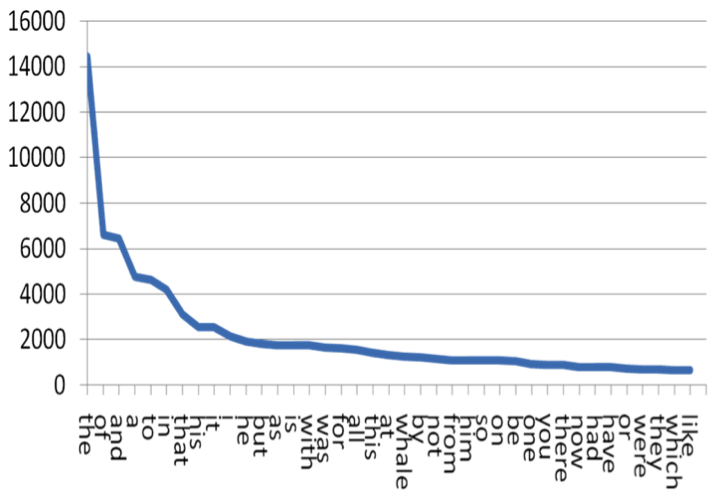
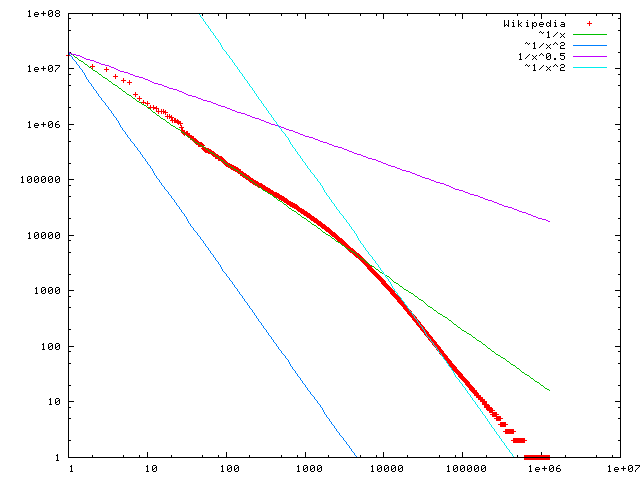
Zipf's law states that given a large sample of words used, the frequency of any word is inversely proportional to its rank in the frequency table. 2nd word is half as common as first word. Third word is 1/3 as common. Etc.
For example:
| Word | Rank | Frequency |
|---|---|---|
| “the” | 1st | 30k |
| "of" | 2nd | 15k |
| "and" | 3rd | 7.5k |
from nltk.corpus import genesis
from collections import Counter
import matplotlib.pyplot as plt
plt.figure(figsize = (5,3))
plt.plot(counts_sorted[:50]);

Does this confirm to Zipf Law? Why or Why not?
from string import punctuation
punctuation
'!"#$%&\'()*+,-./:;<=>?@[\\]^_`{|}~'
sample_clean = [item for item in sample if not item[0] in punctuation]
sample_clean
[('the', 4642),
 ('and', 4368),
 ('de', 3160),
 ('of', 2824),
 ('a', 2372),
 ('e', 2353),
 ('und', 2010),
 ('och', 1839),
 ('to', 1805),
 ('in', 1625)]
What do you make of Zipf's Law in the light of this?
Install the Transformers, Datasets, and Evaluate libraries to run this notebook.
This repository is tested on Python 3.8+, Flax 0.4.1+, PyTorch 1.11+, and TensorFlow 2.6+.
Virtual environments: https://docs.python.org/3/library/venv.html
Venv user guide: https://packaging.python.org/guides/installing-using-pip-and-virtual-environments/
pip install transformers
...or using conda...
conda install conda-forge::transformers
NOTE: Installing transformers from the huggingface channel is deprecated.
Note 7/8/24: got error when importing:
ImportError: huggingface-hub>=0.23.2,<1.0 is required for a normal functioning of this module, but found huggingface-hub==0.23.1.
When installing conda-forge::transformers above it also installed huggingface_hub-0.23.1-py310haa95532_0 as a dependency. However if first run:
conda install conda-forge::huggingface_hub
It installs huggingface_hub-0.23.4. After this, can install conda-forge::transformers and import works without error.
Base class implementing NLP operations. Pipeline workflow is defined as a sequence of the following operations:

https://huggingface.co/docs/transformers/en/main_classes/pipelines
from transformers import pipeline

# first indicate ask. Model optional.
pipe = pipeline("text-classification", model="FacebookAI/roberta-large-mnli")

pipe("This restaurant is awesome")
[{'label': 'NEUTRAL', 'score': 0.7313136458396912}]
Some weights of the model checkpoint at FacebookAI/roberta-large-mnli were not used when initializing RobertaForSequenceClassification: ['roberta.pooler.dense.bias', 'roberta.pooler.dense.weight']
- This IS expected if you are initializing RobertaForSequenceClassification from the checkpoint of a model trained on another task or with another architecture (e.g. initializing a BertForSequenceClassification model from a BertForPreTraining model).
- This IS NOT expected if you are initializing RobertaForSequenceClassification from the checkpoint of a model that you expect to be exactly identical (initializing a BertForSequenceClassification model from a BertForSequenceClassification model).
Device set to use cpu
[{'label': 'NEUTRAL', 'score': 0.7313136458396912}]
classifier = pipeline("sentiment-analysis", model="distilbert/distilbert-base-uncased-finetuned-sst-2-english")
Device set to use cpu
classifier("I've been waiting for a HuggingFace course my whole life.")
[{'label': 'POSITIVE', 'score': 0.9598049521446228}]
classifier("I've been waiting for a HuggingFace course my whole life.")
[{'label': 'POSITIVE', 'score': 0.9598049521446228}]
classifier("I hate this so much!")
[{'label': 'NEGATIVE', 'score': 0.9994558691978455}]
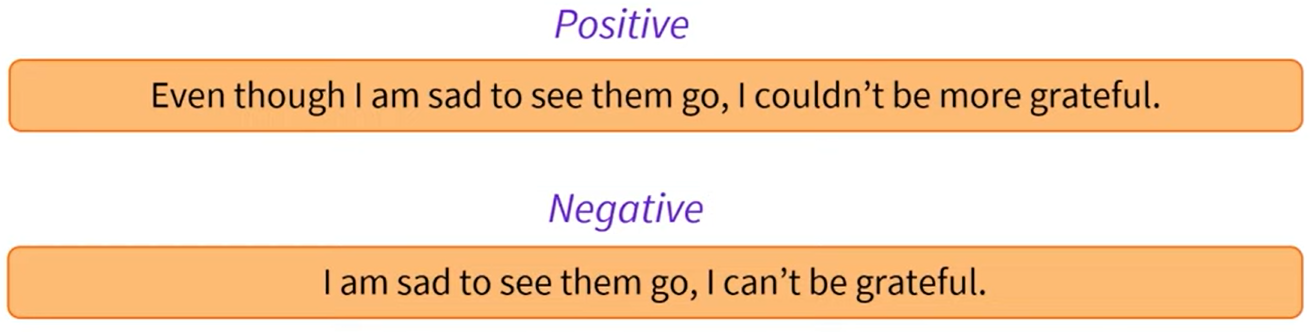
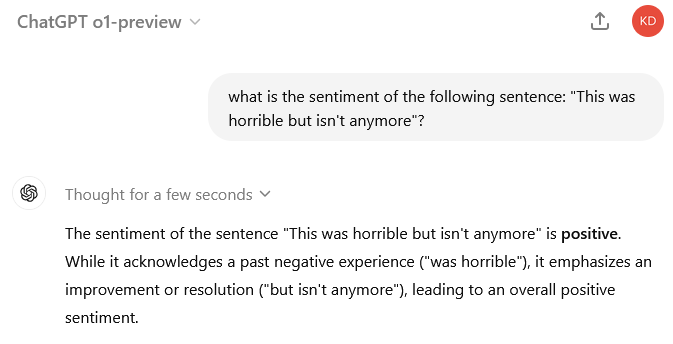
classifier("This isn't horrible anymore.")
[{'label': 'POSITIVE', 'score': 0.9929516911506653}]
classifier("This was horrible but isn't anymore.")
[{'label': 'NEGATIVE', 'score': 0.9913051724433899}]
classifier = pipeline("zero-shot-classification")
classifier(
    "This is a course about the Transformers library",
    candidate_labels=["education", "politics", "business"],
)
No model was supplied, defaulted to facebook/bart-large-mnli and revision d7645e1 (https://huggingface.co/facebook/bart-large-mnli).
Using a pipeline without specifying a model name and revision in production is not recommended.
config.json: 0.00B [00:00, ?B/s]
model.safetensors: 0%| | 0.00/1.63G [00:00<?, ?B/s]
tokenizer_config.json: 0%| | 0.00/26.0 [00:00<?, ?B/s]
vocab.json: 0.00B [00:00, ?B/s]
merges.txt: 0.00B [00:00, ?B/s]
tokenizer.json: 0.00B [00:00, ?B/s]
Device set to use cpu
{'sequence': 'This is a course about the Transformers library',
 'labels': ['education', 'business', 'politics'],
 'scores': [0.8445982933044434, 0.11197470128536224, 0.04342702403664589]}
generator = pipeline("text-generation")
generator("In this course, we will teach you how to")
No model was supplied, defaulted to openai-community/gpt2 and revision 607a30d (https://huggingface.co/openai-community/gpt2).
Using a pipeline without specifying a model name and revision in production is not recommended.
generation_config.json: 0%| | 0.00/124 [00:00<?, ?B/s]
Device set to use cpu
Setting `pad_token_id` to `eos_token_id`:50256 for open-end generation.
[{'generated_text': 'In this course, we will teach you how to read, write, and communicate. These lessons are divided into two areas:\n\n1.) Writing: Writing.\n\nWriting is an activity and is one of the most complex and rewarding skills in'}]
generator = pipeline("text-generation", model="distilgpt2")
generator(
    "In this course, we will teach you how to",
    max_length=30,
    num_return_sequences=2,
)
generation_config.json: 0%| | 0.00/124 [00:00<?, ?B/s]
Device set to use cpu
Truncation was not explicitly activated but `max_length` is provided a specific value, please use `truncation=True` to explicitly truncate examples to max length. Defaulting to 'longest_first' truncation strategy. If you encode pairs of sequences (GLUE-style) with the tokenizer you can select this strategy more precisely by providing a specific strategy to `truncation`.
Setting `pad_token_id` to `eos_token_id`:50256 for open-end generation.
[{'generated_text': 'In this course, we will teach you how to be a full professional with your skills in the workplace and how to work in small, medium and large'},
 {'generated_text': 'In this course, we will teach you how to design a prototype. We offer guidance on what to do, and how to not only implement what you'}]
unmasker = pipeline("fill-mask")
unmasker("This course will teach you all about <mask> models.", top_k=2)
No model was supplied, defaulted to distilbert/distilroberta-base and revision fb53ab8 (https://huggingface.co/distilbert/distilroberta-base).
Using a pipeline without specifying a model name and revision in production is not recommended.
Some weights of the model checkpoint at distilbert/distilroberta-base were not used when initializing RobertaForMaskedLM: ['roberta.pooler.dense.bias', 'roberta.pooler.dense.weight']
- This IS expected if you are initializing RobertaForMaskedLM from the checkpoint of a model trained on another task or with another architecture (e.g. initializing a BertForSequenceClassification model from a BertForPreTraining model).
- This IS NOT expected if you are initializing RobertaForMaskedLM from the checkpoint of a model that you expect to be exactly identical (initializing a BertForSequenceClassification model from a BertForSequenceClassification model).
Device set to use cpu
[{'score': 0.19198477268218994,
  'token': 30412,
  'token_str': ' mathematical',
  'sequence': 'This course will teach you all about mathematical models.'},
 {'score': 0.04209217056632042,
  'token': 38163,
  'token_str': ' computational',
  'sequence': 'This course will teach you all about computational models.'}]
ner = pipeline("ner", grouped_entities=True)
ner("My name is Sylvain and I work at Hugging Face in Brooklyn.")
No model was supplied, defaulted to dbmdz/bert-large-cased-finetuned-conll03-english and revision f2482bf (https://huggingface.co/dbmdz/bert-large-cased-finetuned-conll03-english).
Using a pipeline without specifying a model name and revision in production is not recommended.
config.json: 0%| | 0.00/998 [00:00<?, ?B/s]
model.safetensors: 0%| | 0.00/1.33G [00:00<?, ?B/s]
All PyTorch model weights were used when initializing TFBertForTokenClassification.

All the weights of TFBertForTokenClassification were initialized from the PyTorch model.
If your task is similar to the task the model of the checkpoint was trained on, you can already use TFBertForTokenClassification for predictions without further training.
tokenizer_config.json: 0%| | 0.00/60.0 [00:00<?, ?B/s]
vocab.txt: 0%| | 0.00/213k [00:00<?, ?B/s]
C:\Users\micro\anaconda3\envs\HF_070824\lib\site-packages\transformers\pipelines\token_classification.py:168: UserWarning: `grouped_entities` is deprecated and will be removed in version v5.0.0, defaulted to `aggregation_strategy="simple"` instead.
  warnings.warn(
[{'entity_group': 'PER',
  'score': 0.9981694,
  'word': 'Sylvain',
  'start': 11,
  'end': 18},
 {'entity_group': 'ORG',
  'score': 0.9796019,
  'word': 'Hugging Face',
  'start': 33,
  'end': 45},
 {'entity_group': 'LOC',
  'score': 0.9932106,
  'word': 'Brooklyn',
  'start': 49,
  'end': 57}]
question_answerer = pipeline("question-answering")
question_answerer(
    question="Where do I work?",
    context="My name is Sylvain and I work at Hugging Face in Brooklyn",
)
No model was supplied, defaulted to distilbert/distilbert-base-cased-distilled-squad and revision 626af31 (https://huggingface.co/distilbert/distilbert-base-cased-distilled-squad).
Using a pipeline without specifying a model name and revision in production is not recommended.
config.json: 0%| | 0.00/473 [00:00<?, ?B/s]
model.safetensors: 0%| | 0.00/261M [00:00<?, ?B/s]
All PyTorch model weights were used when initializing TFDistilBertForQuestionAnswering.

All the weights of TFDistilBertForQuestionAnswering were initialized from the PyTorch model.
If your task is similar to the task the model of the checkpoint was trained on, you can already use TFDistilBertForQuestionAnswering for predictions without further training.
tokenizer_config.json: 0%| | 0.00/49.0 [00:00<?, ?B/s]
vocab.txt: 0%| | 0.00/213k [00:00<?, ?B/s]
tokenizer.json: 0%| | 0.00/436k [00:00<?, ?B/s]
{'score': 0.6949759125709534, 'start': 33, 'end': 45, 'answer': 'Hugging Face'}
question_answerer(
    question="How many years old am I?",
    context="I was both in 1990. This is 2023. Hello.",
)
{'score': 0.8601788878440857, 'start': 28, 'end': 32, 'answer': '2023'}
summarizer = pipeline("summarization")
summarizer(
    """
    America has changed dramatically during recent years. Not only has the number of
    graduates in traditional engineering disciplines such as mechanical, civil,
    electrical, chemical, and aeronautical engineering declined, but in most of
    the premier American universities engineering curricula now concentrate on
    and encourage largely the study of engineering science. As a result, there
    are declining offerings in engineering subjects dealing with infrastructure,
    the environment, and related issues, and greater concentration on high
    technology subjects, largely supporting increasingly complex scientific
    developments. While the latter is important, it should not be at the expense
    of more traditional engineering.

    Rapidly developing economies such as China and India, as well as other
    industrial countries in Europe and Asia, continue to encourage and advance
    the teaching of engineering. Both China and India, respectively, graduate
    six and eight times as many traditional engineers as does the United States.
    Other industrial countries at minimum maintain their output, while America
    suffers an increasingly serious decline in the number of engineering graduates
    and a lack of well-educated engineers.
"""
)
No model was supplied, defaulted to sshleifer/distilbart-cnn-12-6 and revision a4f8f3e (https://huggingface.co/sshleifer/distilbart-cnn-12-6).
Using a pipeline without specifying a model name and revision in production is not recommended.
config.json: 0%| | 0.00/1.80k [00:00<?, ?B/s]
pytorch_model.bin: 0%| | 0.00/1.22G [00:00<?, ?B/s]
tokenizer_config.json: 0%| | 0.00/26.0 [00:00<?, ?B/s]
vocab.json: 0%| | 0.00/899k [00:00<?, ?B/s]
merges.txt: 0%| | 0.00/456k [00:00<?, ?B/s]
[{'summary_text': ' America has changed dramatically during recent years . The number of engineering graduates in the U.S. has declined in traditional engineering disciplines such as mechanical, civil, electrical, chemical, and aeronautical engineering . Rapidly developing economies such as China and India continue to encourage and advance the teaching of engineering .'}]
from transformers import pipeline

translator = pipeline("translation", model="Helsinki-NLP/opus-mt-fr-en")
translator("Ce cours est produit par Hugging Face.")
pytorch_model.bin: 0%| | 0.00/301M [00:00<?, ?B/s]
---------------------------------------------------------------------------
ValueError                                Traceback (most recent call last)
Cell In[5], line 3
      1 from transformers import pipeline
----> 3 translator = pipeline("translation", model="Helsinki-NLP/opus-mt-fr-en")
      4 translator("Ce cours est produit par Hugging Face.")

File ~\anaconda3\envs\HF_070824\lib\site-packages\transformers\pipelines\__init__.py:994, in pipeline(task, model, config, tokenizer, feature_extractor, image_processor, framework, revision, use_fast, token, device, device_map, torch_dtype, trust_remote_code, model_kwargs, pipeline_class, **kwargs)
    991             tokenizer_kwargs = model_kwargs.copy()
    992             tokenizer_kwargs.pop("torch_dtype", None)
--> 994         tokenizer = AutoTokenizer.from_pretrained(
    995             tokenizer_identifier, use_fast=use_fast, _from_pipeline=task, **hub_kwargs, **tokenizer_kwargs
    996         )
    998 if load_image_processor:
    999     # Try to infer image processor from model or config name (if provided as str)
   1000     if image_processor is None:

File ~\anaconda3\envs\HF_070824\lib\site-packages\transformers\models\auto\tokenization_auto.py:913, in AutoTokenizer.from_pretrained(cls, pretrained_model_name_or_path, *inputs, **kwargs)
    911             return tokenizer_class_py.from_pretrained(pretrained_model_name_or_path, *inputs, **kwargs)
    912         else:
--> 913             raise ValueError(
    914                 "This tokenizer cannot be instantiated. Please make sure you have `sentencepiece` installed "
    915                 "in order to use this tokenizer."
    916             )
    918 raise ValueError(
    919     f"Unrecognized configuration class {config.__class__} to build an AutoTokenizer.\n"
    920     f"Model type should be one of {', '.join(c.__name__ for c in TOKENIZER_MAPPING.keys())}."
    921 )

ValueError: This tokenizer cannot be instantiated. Please make sure you have `sentencepiece` installed in order to use this tokenizer.
Historic and stereotypical outputs often statistically most likely in the large datasets used ~ data scraped from the internet or past decades of books
BERT trained on English Wikipedia and BookCorpus datasets
from transformers import pipeline

unmasker = pipeline("fill-mask", model="bert-base-uncased")
result1 = unmasker("This man works as a [MASK].")
print('Man:',[r["token_str"] for r in result1])

result2 = unmasker("This woman works as a [MASK].")
print('Woman:',[r["token_str"] for r in result2])
Some weights of the model checkpoint at bert-base-uncased were not used when initializing BertForMaskedLM: ['bert.pooler.dense.bias', 'bert.pooler.dense.weight', 'cls.seq_relationship.bias', 'cls.seq_relationship.weight']
- This IS expected if you are initializing BertForMaskedLM from the checkpoint of a model trained on another task or with another architecture (e.g. initializing a BertForSequenceClassification model from a BertForPreTraining model).
- This IS NOT expected if you are initializing BertForMaskedLM from the checkpoint of a model that you expect to be exactly identical (initializing a BertForSequenceClassification model from a BertForSequenceClassification model).
Man: ['carpenter', 'lawyer', 'farmer', 'businessman', 'doctor']
Woman: ['nurse', 'maid', 'teacher', 'waitress', 'prostitute']
scores1 = [r['score'] for r in result1]
labels1 = [r["token_str"] for r in result1]
scores2 = [r['score'] for r in result2]
labels2 = [r["token_str"] for r in result2]

from matplotlib.pyplot import *

figure(figsize = (5,2))
bar(labels1, scores1);
title('Men');
figure(figsize = (5,2))
bar(labels2, scores2);
title('Women');


result1
[{'score': 0.0751064345240593,
  'token': 10533,
  'token_str': 'carpenter',
  'sequence': 'this man works as a carpenter.'},
 {'score': 0.0464191772043705,
  'token': 5160,
  'token_str': 'lawyer',
  'sequence': 'this man works as a lawyer.'},
 {'score': 0.03914564475417137,
  'token': 7500,
  'token_str': 'farmer',
  'sequence': 'this man works as a farmer.'},
 {'score': 0.03280140459537506,
  'token': 6883,
  'token_str': 'businessman',
  'sequence': 'this man works as a businessman.'},
 {'score': 0.02929229475557804,
  'token': 3460,
  'token_str': 'doctor',
  'sequence': 'this man works as a doctor.'}]